

Prospect List Building: A Signal-Driven Playbook for 2026
Master prospect list building in 2026 with this signal-driven playbook. Learn ICP design, live-web search, scoring, enrichment, and outreach timing.
96% of B2B buyers research companies and products independently before they talk to sales, and 94% of B2B buying groups create a shortlist before vendor contact according to HubSpot sales statistics. That changes what prospect list building is.
If buyers are already deep into research before your rep sends the first email, then a prospect list isn't just a pile of names. It's a system for spotting the right account, the right moment, and the right people around that buying motion. Many teams still treat list building like procurement. Buy data, export CSV, assign reps, repeat. That workflow is why so many outbound programs look busy and perform flat.
I've rebuilt outbound around this problem enough times to say it plainly. Static lists create fake coverage. Useful lists behave more like a monitored queue. They refresh, re-score, drop stale contacts, add new stakeholders, and surface accounts when something changed that makes outreach relevant now.
The split that most guides skip is just as important. A B2B SaaS team should build around buying groups, stack changes, hiring, and website intent. A local agency should build around service area, reputation shifts, new openings, staffing demand, and owner visibility. Both are doing prospect list building. They just need different signals, different cadences, and different routing rules.
Table of Contents
- Why Static Contact Lists Are the Wrong Starting Point in 2026
- Defining a Tight ICP Before You Search for a Single Company
- Search Strategies Across Live-Web Signals That Actually Convert
- Scoring and Filtering Lists for Quality Over Volume
- Enrichment, Verification, and CRM Sync on a Recurring Cadence
- Real-Time Signup Screening for Inbound Lead Quality
- Automation, Outreach Timing, and Workflow Templates
Why Static Contact Lists Are the Wrong Starting Point in 2026
A static list can look full and still leave a rep with nobody worth emailing.
The failure usually shows up at the account level, not the contact level. A CSV says you have coverage because it gives you one Director of Marketing at a company that fits your size and industry filter. The actual buying motion needs a finance owner, an operations stakeholder, and someone who feels the pain day to day. If those people are missing, the row count is fake progress.
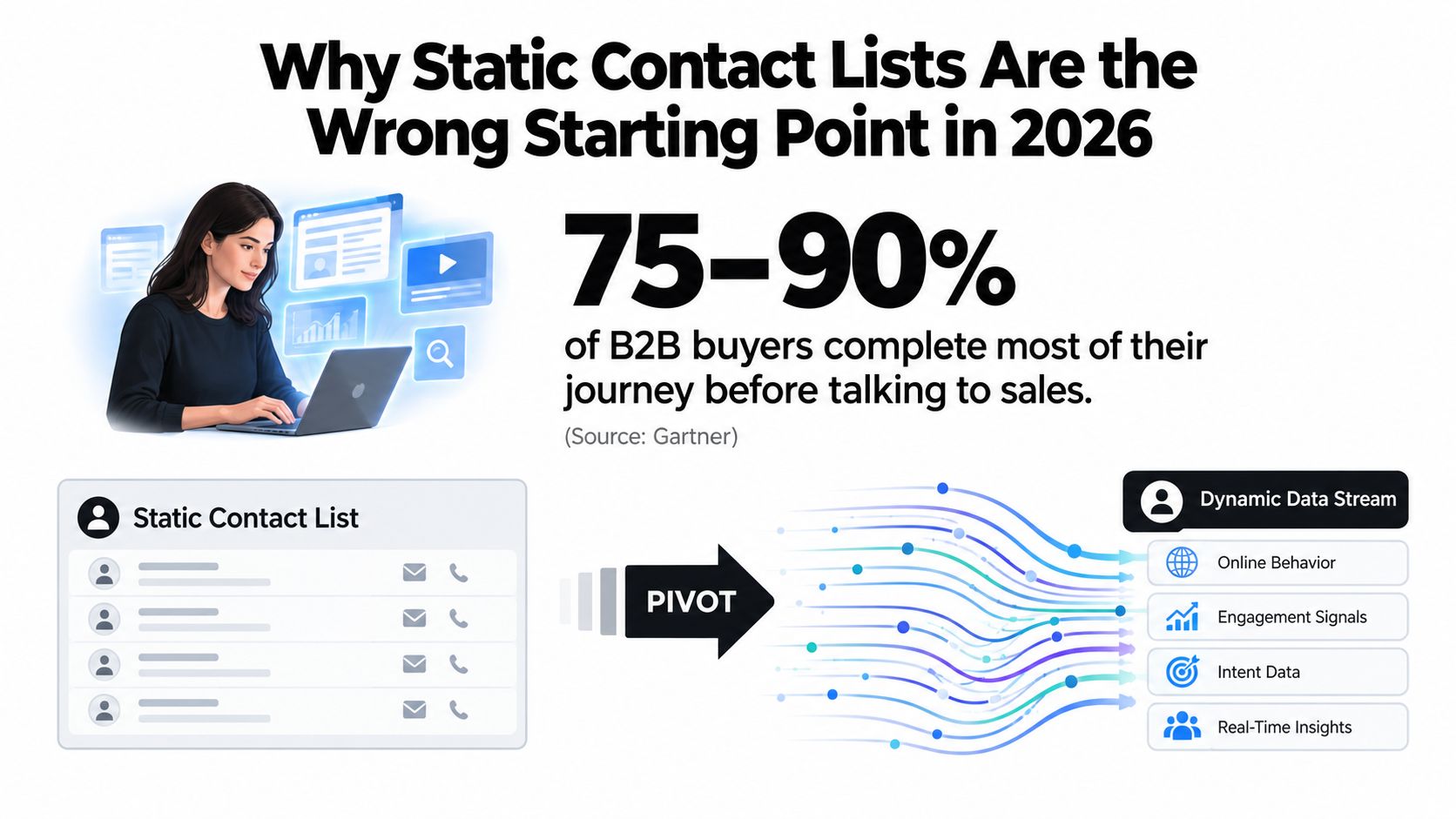
The unit of work is the account, not the row
I have seen this problem in real outbound rebuilds. One SaaS team had thousands of "qualified" contacts in sequence, but reply quality stayed poor because each account had one reachable person and no buying-group coverage. Open rates looked fine. Meetings did not. After we rebuilt the list around accounts first, then added the likely evaluator, budget owner, and operational user, replies got fewer but far more usable.
That trade-off matters. More contacts give reps activity. Better account coverage gives them a chance to start a real sales conversation.
An account-based list also ages differently. The company may still fit your ICP six months later, while half the individual contacts have changed jobs, lost scope, or were never close to the problem you solve. Static lists hide that decay because the spreadsheet still exists.
One independent guide on high-intent B2B prospect lists in 2026 gets two things right. Single-contact targeting breaks fast, and trigger monitoring changes who deserves outreach this week.
If you're training junior SDRs, the definition of the work needs to be tighter too. A short explainer on sales prospecting meaning is useful because it separates targeted account selection from bulk name collection.
What replaces the CSV-first workflow
The replacement is a live signal system tied to accounts.
For B2B SaaS, that usually means a base account list, role coverage by buying group, and recurring checks for stack changes, hiring patterns, product launches, intent spikes, or leadership moves. For a local agency, the signal set is different. New locations, review volume changes, visible ad starts and stops, hiring for front-line staff, and owner activity tell you more than technographic filters ever will.
That split gets missed in generic list-building advice. SaaS teams often overvalue title precision and miss timing. Local agencies often chase timing but ignore whether the account can buy, staff, and service demand profitably.
A good list in 2026 behaves more like an operating queue than a purchased file:
- Accounts come first. Company fit gets decided before contact sourcing.
- Coverage beats volume. Three relevant stakeholders at one account are usually worth more than fifteen isolated contacts across weak-fit companies.
- Signals determine priority. Reps work accounts with a reason to respond now.
- Refresh happens on a cadence. Titles, emails, and account status drift too fast for one-time exports.
- Routing follows business model. SaaS and local agency teams need different triggers, owners, and refresh windows.
Static lists answer who matched a filter on export day. Good prospecting systems answer which accounts deserve attention now, who matters inside them, and what changed since the last pass.
Defining a Tight ICP Before You Search for a Single Company
Teams that skip ICP discipline usually blame their data vendor, their reps, or their copy. The problem starts earlier. If the account definition is loose, every list you build downstream gets expensive fast.
A usable ICP is an operating filter, not a slogan. "Mid-market companies that need growth" gives reps too much room to rationalize weak accounts into the queue. Good outbound programs set the fit rules before anyone opens Apollo, Sales Navigator, Google Maps, or a scraper.
I build ICPs as scorecards with three layers, and I weight them differently by sales motion.
First, define firmographic fit. This is the baseline account shape. For B2B SaaS, that usually includes industry, employee band, region, sales motion, and team structure. For a local agency, the better filters are service radius, number of technicians or locations, owner involvement, and whether the business can support recurring demand without breaking fulfillment.
Then define environment fit. SaaS teams need real context on systems and process maturity, not just company size. Salesforce plus HubSpot suggests a very different buying environment than spreadsheets plus a shared inbox. Local agencies rarely need enterprise technographics. They need proof the business is operationally reachable and commercially active, such as appointment software, an active Google Business Profile, current paid ads, or recent review velocity.
Last, define trigger fit. This is the part many teams treat as optional, then wonder why reply rates stay flat. Fit tells you who could buy. Triggers tell you who might care now. In SaaS, useful triggers include hiring for RevOps, SDRs, or systems roles, a stack change, a funding event, or a new product line. In local agency work, I care more about a new location, a drop in reviews, visible ad launches, service expansion, or a burst of hiring for front-line staff.
If a company clears the first two layers but has no credible reason to act, it belongs in monitored coverage, not active outreach.
Build required fields, preferences, and hard exclusions
Teams usually get sloppy. They create a nice description of the ideal customer, but they never force trade-offs.
Every ICP should spell out:
- Required traits: the account is out if these are missing
- Preferred traits: useful signals that increase priority
- Exclusions: accounts that look similar on paper but waste pipeline
- Trigger thresholds: what change is strong enough to move the account into outreach
For example, a SaaS company with the right headcount but no defined revenue team may still be worth watching, but it should not get the same priority as one hiring a Sales Ops manager after a CRM migration. A local plumbing business with strong reviews but no sign of paid acquisition might fit your geography and staff-size filters, yet still be a poor target for an agency built around ad-driven lead generation.
That distinction saves a lot of list bloat.
Sample ICP cards for two very different outbound motions
| ICP Field | B2B SaaS Example | Local Agency Example |
|---|---|---|
| Industry | B2B SaaS | Home services |
| Company size | 50 to 500 employees | 5 to 25 staff |
| Geography | US-based | Within target metro or service radius |
| Core buyer | RevOps, Sales Ops, VP Sales | Owner-operator or GM |
| Environment fit | Salesforce plus HubSpot | Active Google Business Profile and scheduling software |
| Maturity marker | Dedicated revenue team | Consistent local presence and visible demand gen |
| Trigger examples | Hiring SDRs, adding ops roles, stack changes | Hiring field techs, review decline, new service expansion |
| Exclusions | Agencies, micro teams, non-digital sales motion | Franchises outside service area, inactive profiles |
If you need a tighter framework for documenting this, CapyScout's guide on how to build and use an ideal customer profile is a useful reference.
Pressure-test the ICP before you build the list
A tight ICP should survive four checks.
- It matches closed-won reality. Your best customers should cluster inside it.
- A rep can explain the pain clearly. If the value prop changes account by account, the ICP is still too broad.
- You can find the accounts. If the definition depends on data you cannot source reliably, it is not operational.
- You know who to reject. Good list quality comes from saying no early.
I have seen SaaS teams obsess over title precision while treating account fit like a suggestion. I have seen local agencies do the reverse, chasing obvious timing while ignoring whether the business has buying power, staffing capacity, or basic serviceability. Both mistakes create activity without much pipeline.
The goal is a list your team can refresh and route consistently, not a flattering description of who you wish would buy.
Search Strategies Across Live-Web Signals That Actually Convert
Title-first list building misses the thing that drives replies: change. A prospect list performs better when it runs as a live signal system at the account level, refreshed often enough to catch buying motion while it still matters.
That changes how search should work. Start with an account trigger. Then identify the likely buying group inside that account. Teams that reverse that order usually end up with clean contact data attached to weak timing.
Four signal buckets worth monitoring
Tech-stack signals are useful when the change is recent and relevant to your product. Good sources include job posts, implementation notes, help-center pages, partner directories, and integration docs. If a company just added a system upstream or downstream from what you sell, the message can be specific. If the stack mention is old, cached, or copied from a generic template, skip it. I have seen reps waste weeks on stale stack data pulled from enrichment tools that update too slowly to support timing-based outreach.
Hiring signals work, but only when the role maps to the pain you solve. A SaaS company hiring RevOps, solutions engineers, SDR leaders, or finance systems talent is signaling process change, tooling pressure, or reporting gaps. A local agency should read hiring differently. New technicians, front-desk staff, coordinators, or location managers often point to capacity strain, expansion, or service inconsistency. The same signal does not mean the same thing across motions, and that is where many list-building guides get lazy.
Competitor and category signals often convert better than broad firmographic searches because the buyer is already framing the problem. Comparison pages, migration docs, review responses, partner swaps, and public complaints about a current tool all create stronger outreach angles than "you fit our ICP." A lot of outbound teams underuse these because the data is messier. The trade-off is worth it.
Location and expansion signals matter far more for local and regional sellers than many SaaS-focused playbooks admit. New service-area pages, permits, opening announcements, local posts, review spikes, and fresh location listings can all create a short outreach window. For agencies, these signals often beat title precision because the account itself is changing before the org chart is visible anywhere.
What good searches look like by motion
For B2B SaaS, build searches around operational change inside named account segments. If you sell into finance ops, search for companies mentioning NetSuite, ERP migration work, billing ops hiring, or workflow documentation updates, then layer in your company-size and geography rules. After that, pull the buying group across finance, ops, systems, and executive ownership. One contact is rarely enough when the trigger affects a cross-functional process.
For local agencies, the workflow should be narrower and faster. Search for businesses entering a new service area, opening a second location, adding staff, or showing signs of lead handling strain. Then check whether the account is reachable and real: active website, recent reviews, visible owner or manager presence, and proof they can support demand if your campaign works. Local outreach breaks when teams chase timing without screening for delivery capacity.
One signal that deserves its own playbook is recent funding. It can create urgency, but the timing is narrower than many reps assume because new budget gets claimed quickly by hiring, product, and existing vendor relationships. The short breakdown of funded outreach window skills is a useful reference for handling that motion without overestimating it.
If you want a broader menu of triggers to test, CapyScout's guide to top buying signals and how to find them is a practical companion to this signal-first search approach.
Keep the search disciplined
Three habits keep signal searches usable instead of noisy:
- Scope for recency. Fresh pages, recent posts, and current openings matter more than archived mentions.
- Save the query and rerun it. Good prospecting searches belong in a recurring workflow, not a rep's browser history.
- Tie each search to a real outreach angle. If the trigger does not support a specific reason to contact the account now, it should not enter the queue.
The goal is not more rows. The goal is a refreshed stream of accounts with a clear reason to engage now, split by the motion you run.
Scoring and Filtering Lists for Quality Over Volume
Lists usually fail at the scoring stage, not the sourcing stage. Teams pull a decent set of accounts, then dump every matched contact into sequence because more rows feel safer. Reply rates drop, reps blame copy, and the problem stays in the spreadsheet.
The gap between broad exports and tight segments is not subtle. Emailchaser's cold email statistics roundup cites an analysis of 12 million outreach emails with an 8.5% reply rate, plus a newer average cold-email benchmark of 3.43%. The same page reports lists under 50 prospects averaging 5.8% reply rates, while lists of 1,000 or more averaged 2.1%. That matches what I have seen in SaaS and agency outbound. Bigger lists create more activity. They rarely create better conversations.
The fix is to score at the account level first, then decide whether any contact at that account belongs in an active sequence. That is the part many list-building guides skip. They treat prospecting like contact acquisition, when the job is deciding which accounts deserve attention now.
Keep four scores, not one
A single lead score looks clean in a CRM and causes bad queue decisions.
Use four separate dimensions:
- Fit: How closely the account matches the ICP
- Timing: Whether a current trigger supports outreach now
- Reachability: Whether you can contact the right person without hurting deliverability
- Workability: Whether the account is worth rep time based on deal size, territory, sales motion, or service capacity
I separate timing from fit because they behave differently by motion. In B2B SaaS, timing often comes from hiring, tech-stack changes, new leadership, funding, or product launches. In local agency outbound, timing matters less than workability. A restaurant with weak reviews and no-call answer rates is still a bad target even if it just redesigned its site. A multisite clinic with visible management, recent growth, and enough staff to handle demand often deserves priority before a noisier "hot" account.
Apollo's guidance on prospecting tool data accuracy is useful here because it pushes teams to test data quality in pieces instead of trusting one vendor score. Their recommended workflow includes starting with a tight ICP filter, testing a 200-record sample, validating deliverability, tracking connect rates for two weeks, spot-checking at least 20 records, and reviewing fields separately. They also suggest benchmarks such as 90% or better deliverability for work emails, 85% or better title match, and headcount within 20% of actual.
A practical scoring split by motion
For B2B SaaS, I weight fit and timing first. If the account is in-range on segment, team size, and use case, a fresh trigger can move it into the queue fast. Reachability still matters, but I would rather hold a strong account for verification than flood reps with reachable contacts at weak accounts.
For local agencies, I score fit and workability before timing. Service businesses break outbound economics when the prospect cannot buy soon, cannot handle new volume, or has no visible operator involvement. That is why local list scoring should include simple operational screens such as active reviews, current hours, live contact channels, and signs the business can absorb new leads.
Filter hard before reps ever see the list
Scoring only works if obvious non-fit records never make it into the queue.
Apply hard filters first:
- Industry or niche exclusions
- Geographic limits
- Employee or location bands
- Business model mismatches
- Disqualified tech stacks or service gaps
- Accounts already in pipeline, closed-lost cooldown, or active customer status
Then score what survives. Push top-tier accounts to immediate outreach, keep near-fit accounts in a monitored pool, and suppress anything that would waste SDR time or weaken sender performance.
That turns list building into a maintained signal system instead of a one-time export. The list stays smaller. The queue gets sharper. Reply rates usually improve because reps are working accounts with a reason to respond now, not just contacts who happened to match a filter last quarter.
Enrichment, Verification, and CRM Sync on a Recurring Cadence
A prospect list starts drifting out of date the week you build it. Titles change. Reps leave. Companies get acquired. Local businesses change hours, stop answering the main line, or hand intake to a new manager. If enrichment and verification only happen at upload, the CRM turns into a record of who used to be reachable.
That hurts in two places. Reps waste touches on contacts who are gone, and sender performance drops because bad addresses keep slipping into active sequences.
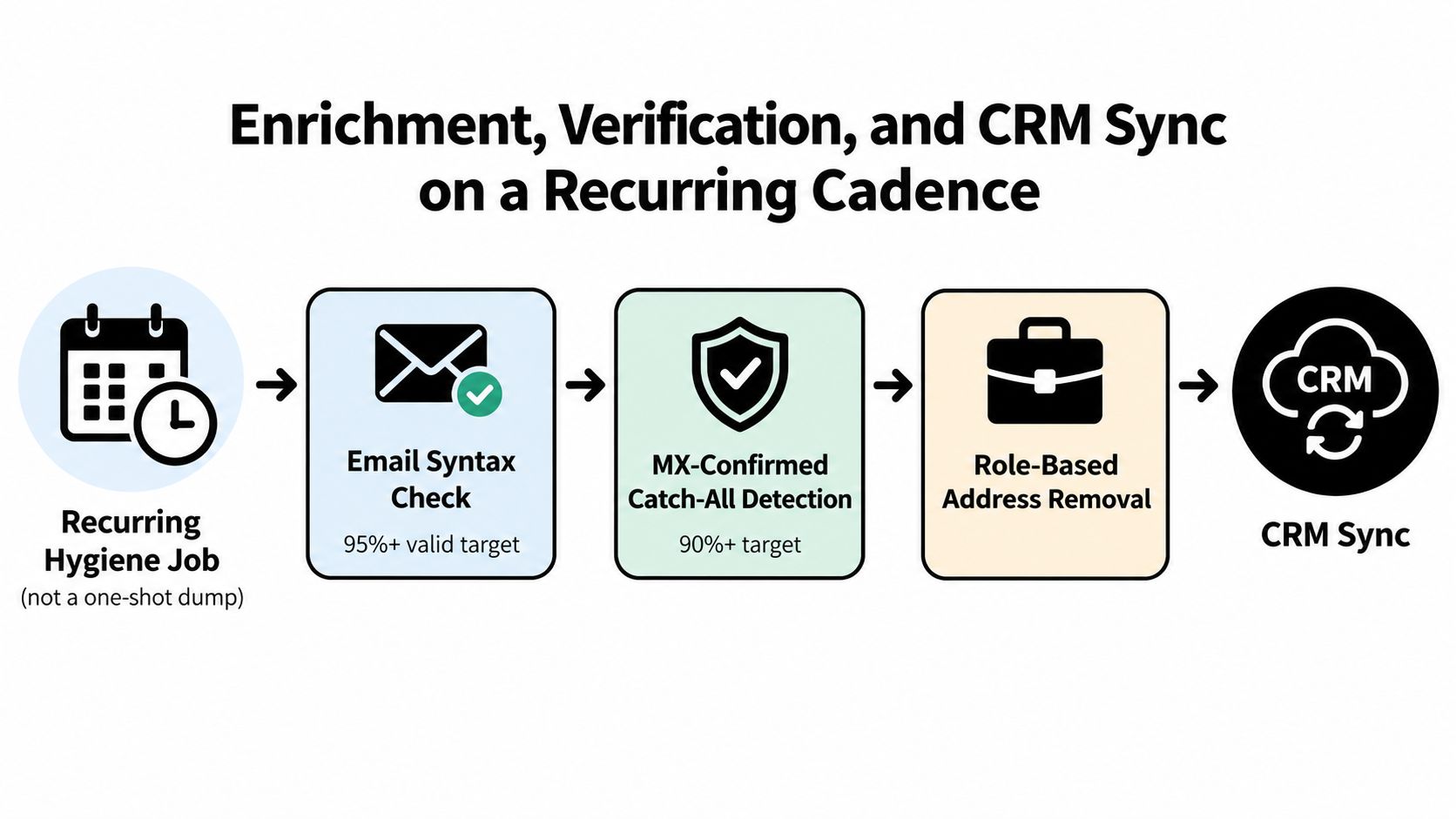
Build the hygiene loop around account priority
The right cadence depends on how the list is used.
For B2B SaaS, I refresh the accounts that are in motion. Open opportunities, current outbound targets, trial signups, and watched accounts with recent buying signals get the fastest cycle. That usually means recurring email verification, title checks, and a rewrite of key firmographic fields before reps touch the record again. Lower-priority accounts can sit on a slower schedule until a new signal pushes them up.
For local agencies, the refresh loop is different. Email matters less than operational reality. A record can be technically valid and still be a waste of time because the business stopped replying to leads, paused intake, lost its operator, or has not updated public contact paths in months. Agency teams should recheck owner or manager identity, phone routing, review activity, website health, and whether the location still looks active before sending the lead to outreach.
Verify in the right order
A practical sequence looks like this:
- Clean the obvious errors first. Remove malformed emails, junk domains, and duplicate records before you pay to enrich anything.
- Verify reachability next. Check domain status, mailbox validity where available, and whether the address is role-based or catch-all.
- Cross-check identity. Job title, company domain, LinkedIn, phone, and geography should line up.
- Normalize the fields that reps use. Standardize company name, website, employee band, ownership type, territory, and source notes.
- Write back only the trusted values. Do not dump every provider field into CRM just because it exists.
Bad writeback rules create more cleanup work than bad source data. I have seen one enrichment pass create duplicate accounts, overwrite clean owner assignments, and stamp low-confidence phone numbers over manually verified ones. The fix is simple. Set field-level rules before sync starts.
Waterfall enrichment is usually the right call for narrow, high-value segments because one provider rarely covers every field well. The trade-off is cost, slower processing, and more conflict resolution across sources. Single-provider enrichment is easier to run, but coverage gaps show up fast once the team starts targeting smaller SaaS categories, founder-led companies, or local service businesses with weak public data.
If you want the field-mapping and sync side spelled out, this practical guide to CRM data enrichment in 2026 covers the operational details.
Sync rules should protect the CRM, not just fill it
The CRM should store a usable account record, not a pile of vendor output. That means separating raw source data from sales-facing fields, preserving provenance on sensitive updates, and keeping confidence thresholds high for anything that changes routing or ownership.
I use a simple rule. If a field affects who gets worked, when it gets worked, or whether it enters a sequence, it needs stricter overwrite logic than a descriptive field. A new employee count estimate is low risk. A changed domain, rep owner, or primary contact is not.
One option here is CapyScout, which writes firmographics, ICP grade, and source-backed why-now notes into CRM records on a daily cadence, then routes alerts through systems like HubSpot, Pipedrive, or Attio. That setup fits teams that want the list to behave like a monitored account queue instead of a static export.
Real-Time Signup Screening for Inbound Lead Quality
A large share of inbound form fills never deserved a sales touch in the first place. The mistake is treating every signup as a lead, instead of treating the form as another signal entering the account system.
That distinction matters. A signup from the right company at the wrong moment is different from a signup from the wrong company with high urgency. Good screening catches both. It decides who gets routed now, who gets held for review, and who should stay out of the sales queue entirely.
The first pass should return three judgments within seconds: fit, risk, and confidence. Fit measures account match against your actual ICP. Risk checks for bad domains, student or personal emails, spam patterns, duplicate trial abuse, and service-scope mismatch. Confidence tells you whether the record is complete enough to trust the route, or whether missing firmographics, weak domain resolution, or conflicting enrichment should force a hold.
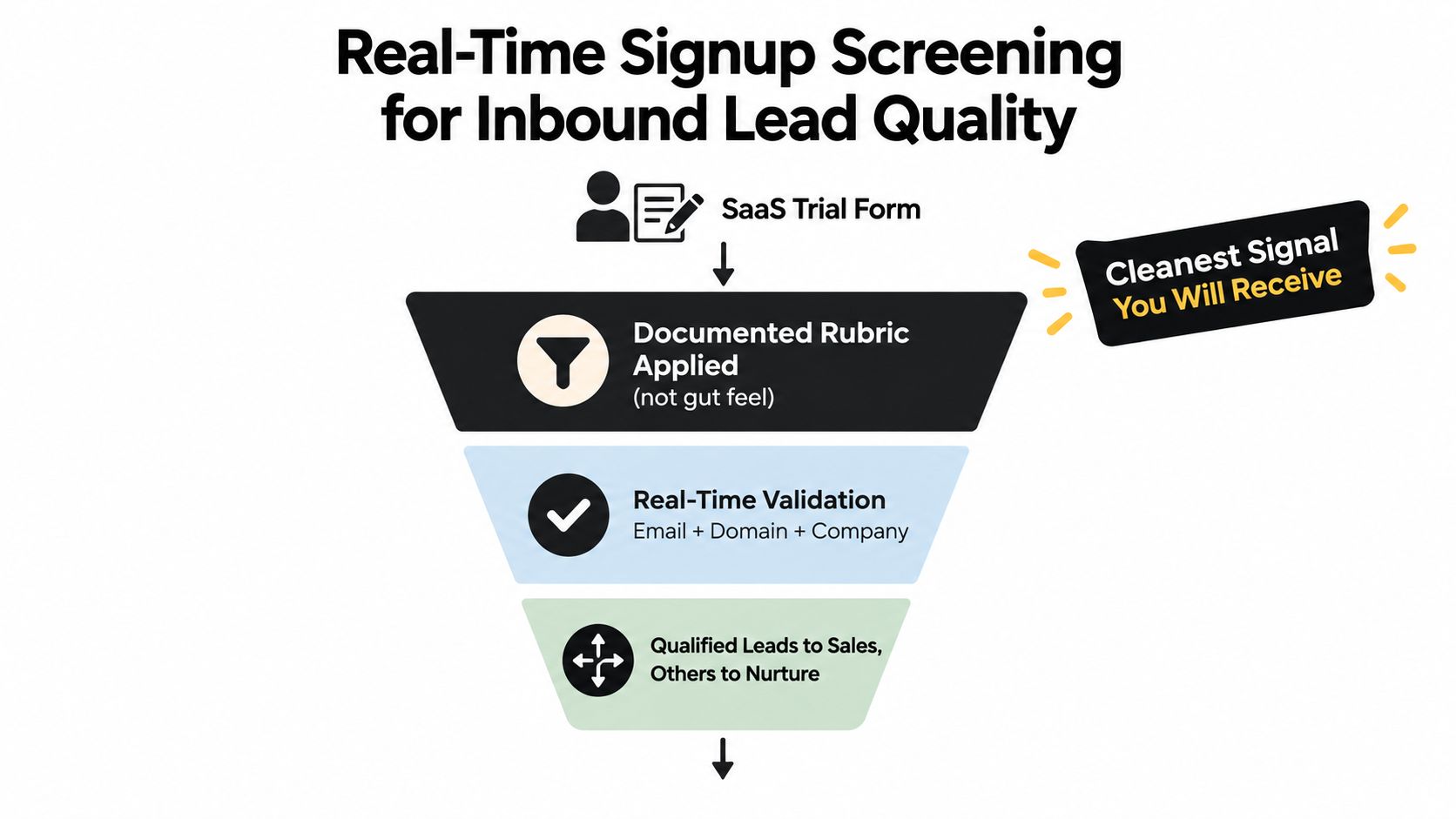
I would document the routing rules before handing them to sales.
For B2B SaaS, that usually means routing high-fit signups with clear company identity and relevant title straight to an AE or SDR, with the context attached. Product-led teams often get this wrong by over-weighting job title and under-weighting account context. A plain "manager" title at a target account with active hiring and a known stack fit can be better than a VP title from a company that will never buy.
Local agencies need a different screen. The same fit, risk, and confidence model still works, but the fields change. Fit is service area, category match, business maturity, and whether the account can realistically support your pricing. Risk is bad phone data, no visible operator, a fake or dead site, or a lead source that attracts price shoppers with no buying intent. Confidence depends less on LinkedIn-style firmographics and more on whether you can verify the business fast enough to route it same day.
This is the split many prospect list building guides miss. Inbound screening should not sit off to the side as a separate revops project. It should use the same account logic as outbound, with faster decision windows and stricter routing rules.
This is a useful visual walkthrough of a qualification flow in action:
Hold versus route should be a rule, not a rep mood.
The trade-off is speed versus false positives. If you route too aggressively, AEs burn time on junk and stop trusting inbound alerts. If you hold too much, good accounts wait too long and reply rates drop. The fix is not a perfect score. The fix is a review loop. Sales ops should check routed versus held signups every week, look at acceptance rates by segment, and adjust thresholds by motion, especially if B2B SaaS and local agency workflows sit in the same stack.
Handled well, signup screening turns inbound from a pile of form fills into a refreshed queue of accounts with current intent. That is the point. The form is not the lead. The account is.
Automation, Outreach Timing, and Workflow Templates
Once the search, scoring, and hygiene pieces are in place, the last job is orchestration. Strong prospect list building stops depending on rep memory.
The core setup has four automation layers. First, saved searches that refresh on a schedule. Second, routing rules that move accounts into a Today queue when they cross your trigger threshold. Third, source-cited draft generation so the first line of outreach references the live signal that earned the account attention. Fourth, hold and review queues for records that fit loosely but don't have enough confidence for sales action yet.
What should be automated and what should not
Automate the repetitive detection work. Don't automate judgment out of the process.
A good saved search can run every night and check for hiring, stack references, review changes, or location events. A good rule can place accounts into the right queue by score and freshness. A good draft can pull in the signal and timestamp so the rep starts from something concrete.
What should not happen is blind sequence enrollment on every refreshed record. That is how teams accidentally turn a signal system back into a batch list.
B2B SaaS vs Local Agency Automation Template
| Layer | B2B SaaS Workflow | Local Agency Workflow |
|---|---|---|
| Search refresh | Saved searches for hiring, stack mentions, competitor-adjacent pages | Saved searches for new openings, local posts, review shifts, service-area expansion |
| Trigger rule | Move account when fit is solid and signal is recent enough to justify outreach | Move business when local issue or growth event creates a practical offer angle |
| Today queue | Prioritize by buying-group coverage and signal strength | Prioritize by owner reachability, urgency, and local relevance |
| Drafting | Open with the observed change, then tie to role-specific pain | Open with the recent business event, then tie to visibility or reputation risk |
| Hold queue | Low-confidence stack matches or partial contact coverage | Weak owner data, unclear service area, or low-conviction local signals |
Timing rules that actually help reps
For B2B SaaS, I like a short response window around active signals. If a company just posted a systems role, changed stack language on the site, or showed category-level research behavior, your outreach should happen while that context is still fresh. The message should mention the trigger plainly, cite where it came from if your process supports that, and route the rep toward the most likely stakeholder first.
For local agencies, the timing window is usually wider but more situational. Review sentiment changes, Google Business Profile stagnation, staffing pushes, or competitor-loss moments often justify a short nurture cycle rather than a one-touch blast. Owners may not respond immediately, but the relevance holds if the issue is current and visible.
Common automation mistakes
These are the ones that usually hurt performance first:
- Syncing too often without re-scoring: Hourly data movement doesn't help if the record hasn't been re-evaluated.
- Treating every signal equally: A vague mention should not rank the same as an obvious buying trigger.
- Skipping source context in drafts: If the first line could be sent to anyone, your automation isn't helping.
- Over-enrolling weak matches: Review queues exist for a reason.
- Building one workflow for both motions: B2B SaaS and local agency outreach need different triggers and different message logic.
The gain from automation isn't speed by itself. It's consistency. Reps get a smaller queue, better timing, and a clearer reason to reach out. Ops gets a system it can tune. Leadership gets cleaner visibility into what kind of list creation turns into conversations.
CapyScout is built for this exact version of prospect list building: finding fit accounts on the live web, scoring inbound signups, enriching CRM records, and monitoring buying signals so teams know who to contact and why now. If you want a system that supports both B2B SaaS workflows and local-market outreach without forcing everything into a static list model, visit CapyScout.